Product updates

What is new in Donna CRM

See how each Donna CRM update helps you stay closer to your contacts, keep work moving, and get more done from Gmail. Explore what's new and how to put it to work.

6 product updatesNew ways to workAvailable in Donna today
Donna CRM app iconCurrent release

Version 0.3.7

Bring Donna to Brave

Prefer Brave? You can now use Donna’s Gmail context, contact enrichment, labels, meeting tools, Google Sheets imports, and Drive file context without switching browsers.

July 10, 2026See what's new

Release history

See how Donna has grown

From the first release, Donna has focused on one goal: helping you turn Gmail conversations into organized relationships and clear next steps, without adding more CRM admin.

What's new in version 0.3.7

Bring Donna to Brave

Prefer Brave? You can now use Donna’s Gmail context, contact enrichment, labels, meeting tools, Google Sheets imports, and Drive file context without switching browsers.

01

Donna for Brave

Bring your Gmail-first CRM workflow to Brave, from seeing the context behind a conversation to organizing email and working with connected Google tools.

How it helps

  • See contact and pipeline context beside Gmail conversations
  • Organize conversations with Gmail labels and Donna workflows
  • Schedule meetings, import contacts from Sheets, and view related Drive files
  • Keep Google access protected outside browser storage

How to use it

  1. 1Install or update Donna CRM in Brave.
  2. 2Sign in and connect the Google tools you want to use.
  3. 3Open Gmail and carry on - Donna recognizes Brave automatically.

What's new in version 0.3.6

A smoother first day with Donna

Donna now guides you from installation to your first useful workflow, so you can start small, see your progress, and discover more when you are ready.

01

A clear path to your first win

Donna walks you through the most useful first steps, helping you get value quickly and add more as your workflow grows.

How it helps

  • Know exactly what to do after connecting your account
  • Discover each feature with a short, helpful introduction
  • Pause setup and pick up where you left off at any time

How to use it

  1. 1Choose Get started when Donna opens for the first time.
  2. 2Follow the checklist to set up the features that fit your work.
  3. 3Explore each feature when you are ready to put it to use.
02

See your progress come to life

Your setup becomes a simple pipeline inside Donna, giving you a hands-on introduction to the same visual workflow you can use for deals, candidates, clients, and more.

How it helps

  • See every setup step in one easy-to-follow view
  • Watch completed steps move into Done as you make progress
  • Explore a sample Donna Support contact to see how relationship context works
03

Connect more when you are ready

Start using Donna without linking every Google service at once. Calendar, Drive, and Sheets are introduced when you choose a feature that uses them.

How it helps

  • Schedule meetings or check availability with Google Calendar
  • View files connected to a contact from Google Drive
  • Import contacts from Google Sheets

What's new in version 0.3.5

Let Donna scan while you keep working

Start an inbox scan, return to your email, and let Donna prepare recommendations in the background. It remembers where it left off and lets you know when everything is ready.

01

An inbox scan that does not interrupt your day

You no longer need to keep the setup screen open while Donna learns from your recent conversations. Carry on with email and come back when your personalized suggestions are ready.

How it helps

  • Keep working in Gmail while Donna reviews recent conversations
  • Pick up the same scan after Gmail or the extension restarts
  • Get a notification when your recommendations are ready
  • Return later to review recommendations that are already ready

How to use it

  1. 1Start an inbox scan during setup.
  2. 2Return to Gmail and carry on with your day.
  3. 3Open Donna when the scan is ready to review your suggested contacts, pipelines, and follow-ups.

What's new in version 0.3.4

Use Donna in the language that feels natural

Donna now speaks English, German, French, Dutch, Filipino, and Russian, making it easier to manage relationships in the language you know best.

01

Six languages, one familiar Donna

From everyday labels to helpful guidance and settings, Donna can match one of six supported browser languages.

How it helps

  • Work in English, German, or Dutch
  • Work in French, Filipino, or Russian
  • See Donna guidance and settings in your chosen language

How to use it

  1. 1Choose a supported language in your browser settings.
  2. 2Reload Gmail after changing the language.
  3. 3Donna will open in the matching language.

What's new in version 0.3.1

Turn your inbox into a ready-to-use CRM

Instead of starting from a blank CRM, Donna reviews recent conversations and suggests the contacts, pipelines, and follow-ups that already matter to you.

01

A head start built from your inbox

Donna looks across up to 50 recent Gmail conversations to find the people, active work, and next steps worth bringing into your CRM.

How it helps

  • Get pipeline suggestions shaped around sales, hiring, support, or other work in your inbox
  • Find contacts worth adding, with helpful tags
  • Surface follow-ups that could otherwise slip through the cracks
  • Keep recommended pipeline cards connected to their Gmail threads

How to use it

  1. 1Ask Donna to set up your CRM from your Gmail inbox.
  2. 2Confirm the inbox scan.
  3. 3Review the suggested pipelines, contacts, and follow-up tasks.
  4. 4Choose whether to include contacts and tasks, then create your pipelines.
02

Review everything before it is created

See the pipelines Donna recommends first, then decide whether to also import the suggested contacts and create follow-up tasks.

How it helps

  • Preview recommended pipeline names, stages, fields, and cards
  • Choose whether to import the suggested contacts
  • Choose whether to create the suggested follow-up tasks

What's new in version 0.3

Meet Donna: your CRM inside Gmail

Donna brings contacts, deals, follow-ups, email context, and AI help into the inbox, so your relationships can move forward without another tool competing for your attention.

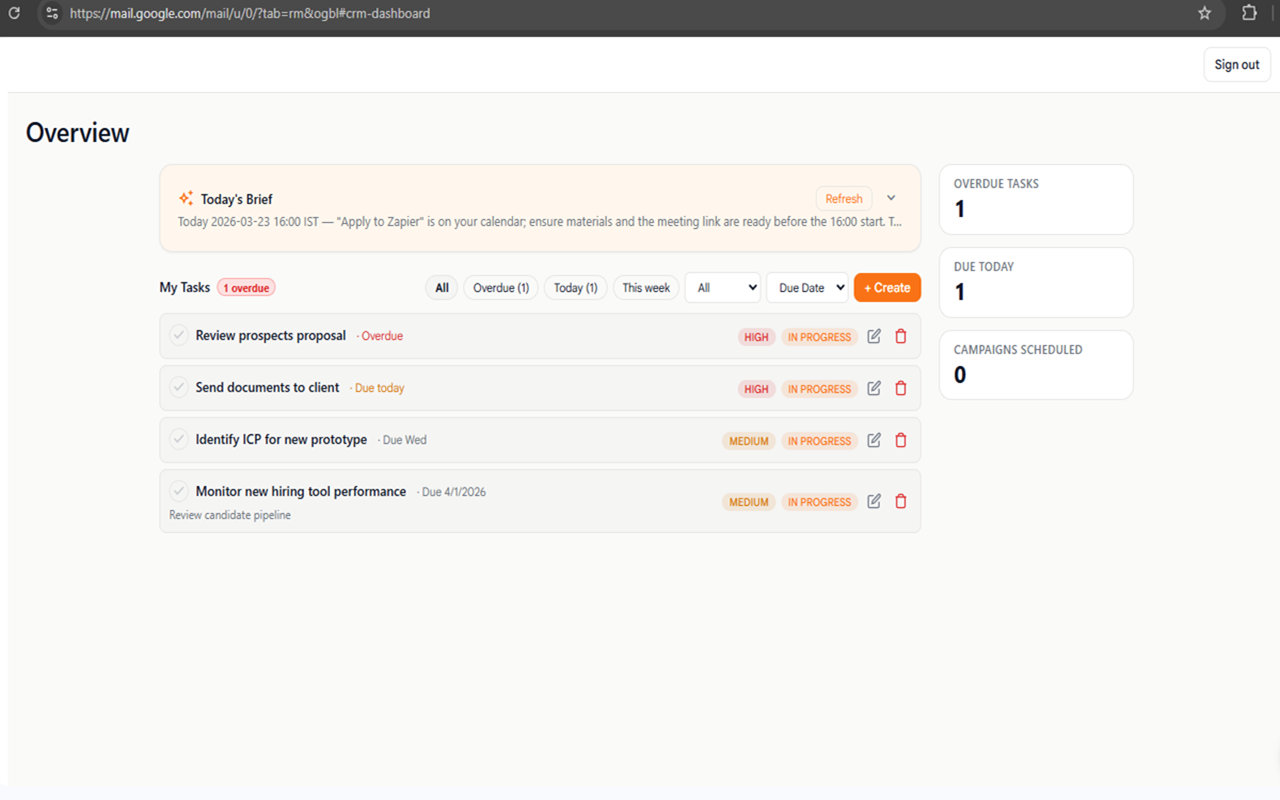
Donna CRM overview workspace inside Gmail
01

Everything you need to keep relationships moving

Keep contacts, deals, and next steps beside the conversations that drive them. No separate spreadsheet, no extra tab, and far less catching up later.

How it helps

  • Remember every relationship with searchable notes, tags, and activity
  • See deals and other work move through flexible visual stages
  • Give every contact or opportunity a clear next step and due date

How to use it

  1. 1Open Donna from Gmail.
  2. 2Find or create a contact from the conversation in front of you.
  3. 3Add them to a pipeline and set the next follow-up.
02

The right context, beside every conversation

Open an email and immediately see who you are speaking with, what is in progress, and what should happen next.

How it helps

  • See contact details while reading the conversation
  • Know which deals or workflows are connected to the thread
  • Open the full relationship record whenever you need the bigger picture
03

An AI assistant that knows the conversation

Ask Donna to make sense of a long thread, help with a reply, or turn a conversation into a useful next step.

How it helps

  • Catch up on long conversations in seconds
  • Draft a thoughtful reply using the email in front of you
  • Turn conversation details into contacts, tasks, or deal updates you can review
04

Grow from personal follow-ups to repeatable outreach

When you are ready to do more, Donna helps you reach groups, spot engagement, automate repeat work, and make time for the next conversation.

How it helps

  • Send personal campaigns to the right groups of contacts
  • Use email engagement as a signal for when to follow up
  • Automate the CRM steps you repeat most often
  • Schedule meetings with Google Calendar when a conversation is ready to move forward

Built around real work

Every update, explained through what it helps you do

No maintenance logs or behind-the-scenes details - just the improvements that make Donna more useful in your inbox.

More value in Gmail

See new ways to organize, follow up, and stay closer to customers.

Practical examples

Learn when to use each feature and how it fits into a normal workday.

Ready when you are

Everything shown here is available in the published Donna CRM extension.

Current release

Try Donna 0.3.7 in your inbox

Install Donna CRM and keep contacts, pipelines, follow-ups, and email context where you already work.